

Elementor is one of the most popular and versatile page builder plugins for WordPress. It enables you to create beautiful and responsive websites without any coding skills. However, if you want to take your website design to the next level, you might want to consider using some of the best Elementor addons that can extend its functionality and add more options and widgets to your toolbox.
In this post, we will introduce you to some of the best Elementor addons that you can use on your WordPress website. We will also highlight their features, pricing, and compatibility with Elementor.
- Introduction: Elementor Plugin
- What are Elementor Addons?
- Why Elementor Addons Matter in 2026
- How to Choose the Best Elementor Addons?
- Best Elementor Addons for WordPress Website
- Top Free Elementor Addons for Beginners
- Best Premium Elementor Addons for Professionals
- Addons for Dynamic Content & Advanced Design
- Addons for E-Commerce & WooCommerce Integration
- Addons for SEO & Performance Optimization
- Addons for Marketing & Lead Generation
- Best All-in-One Elementor Addon Suites
- 5 Best Popular Elementor Addons for WordPress
- Conclusion: Building a Lean, Powerful Elementor Toolkit
Introduction: Elementor Plugin
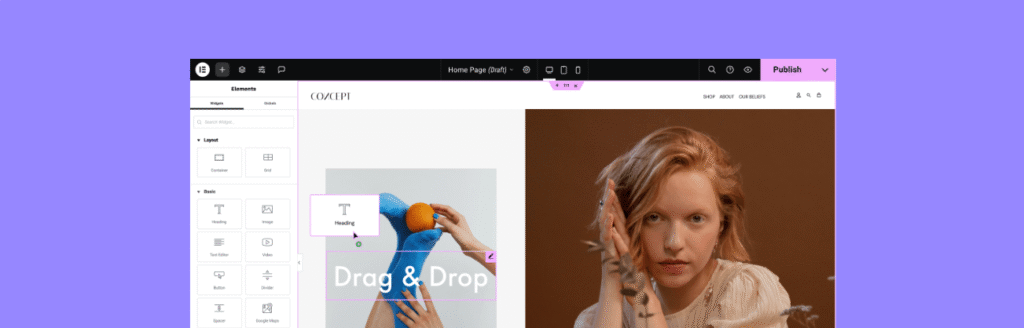
Elementor remains the most popular WordPress page builder in 2026, and its power truly shines when paired with the right addons. These plugins extend Elementor’s core functionality, offering advanced design widgets, dynamic content tools, WooCommerce integrations, and marketing features that help websites stand out. Whether you’re a beginner looking for free addons like Essential Addons Lite or a professional seeking premium suites such as Crocoblock JetPlugins or Ultimate Addons for Elementor, the right toolkit can transform your site into a high-performing, visually engaging platform.
As WordPress evolves, addon developers are focusing on AI-powered design assistants, accessibility-first features, and performance optimization to meet modern web standards. From WooCommerce builders like ShopEngine to dynamic content tools like JetEngine, the best Elementor addons in 2026 balance functionality with speed, ensuring compliance with Google’s Core Web Vitals. The key is to build a lean, purposeful stack—choosing addons that solve specific needs without bloating your site—so your WordPress website stays fast, scalable, and future-ready.
What are Elementor Addons?
Elementor addons are plugins that add new features, widgets, templates, and functionality to Elementor. They can help you create more complex and unique layouts, add more interactivity and animation effects, integrate with other plugins and services, and customize your website in various ways.
There are hundreds of Elementor addons available in the WordPress repository and other marketplaces. Some of them are free, while others require a premium license. Some of them are compatible with both Elementor free and pro versions, while others require Elementor pro to work.
Why Elementor Addons Matter in 2026
Elementor continues to dominate the WordPress ecosystem in 2026, powering millions of websites with its drag-and-drop builder. While Elementor Pro offers robust features, addons unlock advanced design, dynamic content, and marketing integrations that help websites stand out. Choosing the right addons ensures performance, scalability, and a lean toolkit without plugin bloat.
How to Choose the Best Elementor Addons?
With so many options available, how do you choose the best Elementor addons for your website? Here are some factors that you should consider before installing any Elementor addon:
- Features: What kind of features does the addon offer? Does it provide widgets that you need or want to use on your website? Does it have any unique or innovative functionality that sets it apart from other addons?
- Compatibility: Is the addon compatible with your version of Elementor (free or pro)? Is it compatible with your theme and other plugins that you use on your website? Does it work well on different devices and browsers?
- Performance: Does the addon affect your website speed or performance? Does it load fast and smoothly? Does it have any conflicts or errors with other plugins or scripts?
- Features vs. bloat: Focus on what you need—don’t install every widget pack.
- Support: Does the addon developer provide regular updates and bug fixes? Do they offer documentation and tutorials on how to use the addon? Do they have a dedicated support team or forum where you can get help if you encounter any issues?
- Pricing: How much does the addon cost? Is it worth the value that it provides? Do they offer a free trial or a money-back guarantee? Do they have any discounts or offers for multiple sites or licenses?
Best Elementor Addons for WordPress Website
Based on these criteria, we have selected some of the best Elementor addons that you can use on your WordPress website. Here they are:
Top Free Elementor Addons for Beginners
- Essential Addons for Elementor (Free) – 70+ widgets, lightweight, beginner-friendly.
- Element Pack Lite – Offers basic creative widgets like sliders and galleries.
Best Premium Elementor Addons for Professionals
- Ultimate Addons for Elementor (UAE) – Advanced design widgets, WooCommerce modules.
- Crocoblock Suite – JetPlugins for dynamic content, booking systems, and e-commerce.
- PowerPack Addons – Professional widgets with focus on speed and usability.
Addons for Dynamic Content & Advanced Design
- JetEngine (Crocoblock) – Custom post types, listings, and dynamic content.
- Dynamic Content for Elementor – Conditional logic, advanced templates, and integrations.
Addons for E-Commerce & WooCommerce Integration
- WooLentor – Product grids, custom checkout, and cart enhancements.
- ShopEngine – Complete WooCommerce builder with templates and widgets.
Addons for SEO & Performance Optimization
- Schema Pro (UAE integration) – Adds structured data for better rankings.
- WP Rocket + Elementor compatibility – Ensures fast loading and Core Web Vitals compliance.
Addons for Marketing & Lead Generation
- Convert Pro – Popups, opt-ins, and lead capture forms.
- Elementor Extras – Interactive widgets for engagement.
- MailPoet Integration – Email marketing directly from WordPress.
Best All-in-One Elementor Addon Suites
- Crocoblock (JetPlugins) – Covers dynamic content, WooCommerce, booking, and design.
- Ultimate Addons for Elementor – Trusted by agencies for scalability.
5 Best Popular Elementor Addons for WordPress
1. Ultimate Addons for Elementor
Ultimate Addons for Elementor is one of the most popular and trusted addons for Elementor. It is developed by Brainstorm Force, the same team behind Astra theme and other popular plugins. It offers 40+ widgets and extensions that can help you create stunning websites with Elementor.
Some of the features of Ultimate Addons for Elementor are:
- Advanced Heading: Add eye-catching headings with custom fonts, colors, gradients, backgrounds, etc.
- Modal Popup: Create popups with any content type such as images, videos, forms, etc.
- Timeline: Display chronological events or stories in a vertical or horizontal timeline.
- Video Gallery: Showcase your videos in a responsive and stylish gallery with lightbox and thumbnails.
Ultimate Addons for Elementor is compatible with both Elementor free and pro versions. It also works well with any theme and plugin that supports Elementor. It has a lightweight and optimized code that does not affect your website’s speed or performance.
Ultimate Addons for Elementor costs $69 per year for unlimited websites. You can also get it as part of the Astra Agency Bundle that includes Astra Pro theme, WP Portfolio plugin, Convert Pro plugin, Schema Pro plugin, SkillJet Academy access, and more for $249 per year for unlimited websites. You can also try it for free for 14 days with a money-back guarantee.
2. ElementsKit
ElementsKit is another powerful and feature-rich addon for Elementor. It includes 60+ widgets, 20+ extensions, 600+ ready-made templates and sections, a header and footer builder, a mega menu builder, a layout library, and more.
Some of the features of ElementsKit are:
- Accordion: Create collapsible content panels with icons, images, etc.
- Advanced Tab: Create tabbed content with vertical or horizontal orientation, animation effects, etc.
- Chart: Display data in various chart types such as line, bar, pie, doughnut, etc.
- Countdown: Add a countdown timer with custom styles and actions.
- Facebook Feed: Display your Facebook posts, photos, videos, etc. on your website.
- Image Comparison: Compare two images with a slider or a mouse hover effect.
- Lottie Animation: Add animated graphics to your website using Lottie files.
- Parallax: Add parallax scrolling effects to your sections and widgets.
- Testimonial: Showcase your customer reviews and ratings with different layouts and styles.
ElementsKit is compatible with both the Elementor free and pro versions. It also works well with any theme and plugin that supports Elementor. It has a modular architecture that lets you enable or disable the widgets and extensions that you need or don’t need.
ElementsKit costs $39 per year for one website, $79 per year for unlimited websites, or $399 for a lifetime license for unlimited websites. You can also use the free version that includes 20+ widgets and 10+ extensions.
3. Element Pack
Element Pack is another comprehensive and versatile addon for Elementor. It offers 180+ widgets and extensions that cover almost every aspect of website design and functionality.
Some of the features of Element Pack are:
- Audio Player: Play audio files on your website with custom controls and styles.
- FAQ: Create frequently asked questions with toggle or accordion style.
- Google Map: Embed Google Maps on your website with custom markers, styles, zoom levels, etc.
- Instagram Feed: Display your Instagram posts, stories, reels, etc. on your website.
- Post Grid: Display your posts in a grid layout with different pagination types and filters.
- QR Code: Generate QR codes for any text or URL on your website.
Element Pack is compatible with both the Elementor free and pro versions. It also works well with any theme and plugin that supports Elementor. It has a fast and optimized code that does not affect your website’s speed or performance.
Element Pack costs $24 per year for one website, $49 per year for unlimited websites, or $199 for a lifetime license for unlimited websites. You can also use the free version that includes 30+ widgets and extensions.
4. Master Addons
Master Addons is another popular and reliable addon for Elementor. It includes 50+ widgets and extensions that can help you create stunning websites with Elementor.
Some of the features of Master Addons are:
- Animated Headlines: Add animated headlines to your pages with different effects and styles.
- Custom Breakpoints: Set custom breakpoints for different devices and screen sizes.
- Dual Heading: Add dual headings to your pages with different colors, fonts, sizes, etc.
- Image Hover Effects: Add hover effects to your images with captions, icons, overlays, etc.
- News Ticker: Display breaking news or announcements on your website with scrolling or fading effects.
- Progress Bar: Display progress bars with different shapes, colors, animations, etc.
- Restrict Content: Restrict content access based on user roles or login status.
Master Addons is compatible with both the Elementor free and pro versions. It also works well with any theme and plugin that supports Elementor. It has a lightweight and modular code that lets you enable or disable the widgets and extensions that you want or don’t want.
Master Addons costs $29 per year for one website, $49 per year for unlimited websites, or $149 for a lifetime license for unlimited websites. You can also use the free version that includes 20+ widgets and extensions.
5. HT Mega
HT Mega is another comprehensive and feature-rich addon for Elementor. It offers 80+ widgets and extensions that can help you create any type of website with Elementor.
Some of the features of HT Mega are:
- Carousel: Create carousels with different content types such as images, posts, products, etc.
- Contact Form 7: Integrate the Contact Form 7 plugin with Elementor and style your forms with different options.
- Flip Box: Create flip boxes with different effects and content on both sides.
- Image Magnifier: Add a magnifying glass effect to your images with custom zoom levels and positions.
- Logo Showcase: Display logos of your clients, partners, sponsors, etc. with different layouts and styles.
- Tabs: Create tabs with different content types such as text, images, videos, etc.
HT Mega is compatible with both the Elementor free and pro versions. It also works well with any theme and plugin that supports Elementor. It has a clean and optimized code that does not affect your website’s speed or performance.
HT Mega costs $29 per year for one website, $59 per year for unlimited websites, or $199 for a lifetime license for unlimited websites. You can also use the free version that includes 40+ widgets and extensions.
Conclusion: Building a Lean, Powerful Elementor Toolkit
In 2026, the best Elementor addons are those that balance functionality with performance. Whether you’re a beginner or an agency professional, focus on addons that solve specific problems—dynamic content, WooCommerce, SEO, or marketing—without overloading your site. A lean toolkit ensures your WordPress website remains fast, scalable, and future-ready.
Elementor is a powerful and versatile page builder plugin for WordPress. However, you can enhance its features and capabilities by using some of the best Elementor addons available in the market. In this post, we have introduced you to some of the best Elementor addons that you can use on your WordPress website. We hope that this post has helped you find the best Elementor addons for your website needs and goals.
Read More: