
WhatsApp has become one of the most powerful communication tools for businesses worldwide. With over 2.7 billion active users, integrating WhatsApp into your WordPress site can dramatically improve customer engagement, support, and conversions. The right plugin allows you to add click-to-chat buttons, automate responses, manage leads, and even integrate with WooCommerce for order tracking. In this blog, we’ll explore the 10 best WhatsApp plugins for WordPress, their features, pros and cons, and how they can help you build stronger customer relationships.
- Why Use WhatsApp Plugins on WordPress?
- Best WhatsApp plugins for WordPress
- 1. Click to Chat
- 2. WP Social Chat (Formerly WhatsApp Chat)
- 3. WhatsApp Chat by QuadLayers
- 4. Join.Chat
- 5. WhatsApp Contact Button
- 6. WhatsApp Chat WordPress
- 7. WhatsApp Me
- 8. Chaty
- 9. WhatsApp Chat Support
- 10. WP WhatsApp Button
- Updated Comparison Table
- How to Choose the Right Plugin
- Risks & Considerations
- Final Verdict: WhatsApp Plugins on WordPress
Why Use WhatsApp Plugins on WordPress?
- Instant communication: Customers prefer WhatsApp over email or forms.
- Higher conversion rates: Quick replies reduce drop-offs.
- Personalized support: Build trust with real-time conversations.
- Automation: Save time with chatbots and pre-set replies.
- Integration: Sync with WooCommerce, CRM, and marketing tools.
Best WhatsApp plugins for WordPress
1. Click to Chat
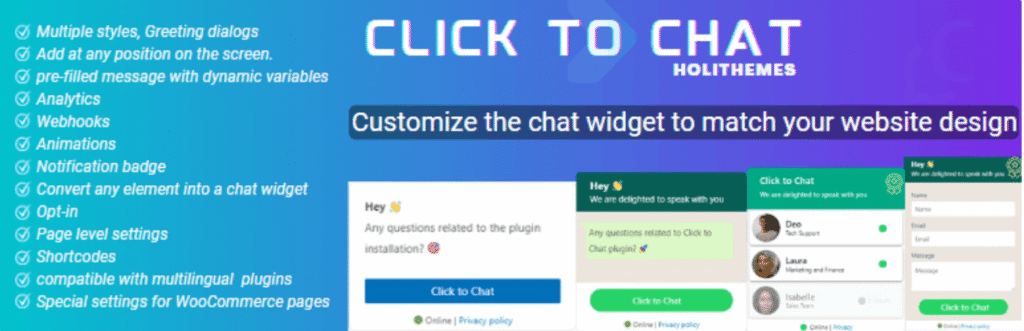
Intro: Click to Chat is a lightweight plugin designed for businesses that want a quick, no-frills way to add WhatsApp chat buttons to their site.
- Pros: Free, simple setup, minimal impact on site speed.
- Cons: Limited automation.
2. WP Social Chat (Formerly WhatsApp Chat)
Intro: WP Social Chat offers a polished chat widget that supports multiple agents, making it ideal for businesses with customer support teams.
- Features: Floating widget, agent profiles, WooCommerce integration.
- Pros: Professional look, multi-agent support.
3. WhatsApp Chat by QuadLayers
Intro: Tailored for WooCommerce stores, this plugin lets customers chat directly about specific products, boosting sales and reducing cart abandonment.
- Pros: Perfect for eCommerce.
- Cons: Advanced setup needed.
4. Join.Chat
Intro: Join.Chat is a powerful plugin that combines WhatsApp integration with automation, chatbots, and analytics.
- Features: Automated greetings, FAQs, Google Analytics integration.
- Pros: Strong automation, tracking support.
- Cons: Free version limited.
5. WhatsApp Contact Button
Intro: A beginner-friendly plugin that adds a simple WhatsApp button to your site without overwhelming features.
- Pros: Very easy to use.
- Cons: No advanced features.
6. WhatsApp Chat WordPress
Intro: Built for agencies and teams, this plugin allows multiple agents with working hours and a professional floating widget.
- Features: Agent profiles, availability schedules, floating widget.
- Pros: Great for teams.
- Cons: Paid plugin.
7. WhatsApp Me
Intro: WhatsApp Me is a minimalist plugin that adds a floating WhatsApp button triggered by user actions like scrolling or time delay.
- Features: Lightweight design, trigger-based display.
- Pros: Minimalist, fast.
- Cons: Limited functionality.
8. Chaty
Intro: Chaty is a multi-channel communication plugin that supports WhatsApp alongside Messenger, Telegram, and more.
- Features: Floating widget with multiple chat options.
- Pros: All-in-one solution.
- Cons: Can feel cluttered if only WhatsApp is needed.
9. WhatsApp Chat Support
Intro: A premium plugin focused on customer support, offering advanced features like department-based routing and availability schedules.
- Features: Department routing, agent availability, WooCommerce integration.
- Pros: Professional-grade support features.
- Cons: Paid only.
10. WP WhatsApp Button
Intro: A simple yet effective plugin that adds customizable WhatsApp buttons anywhere on your site, perfect for small businesses.
- Pros: Easy to use, flexible.
- Cons: No automation.
Updated Comparison Table
| Plugin | Best For | Free/Paid | Multi-Agent | WooCommerce | Automation |
|---|---|---|---|---|---|
| Click to Chat | Simple integration | Free | Yes | No | No |
| WP Social Chat | Multi-agent support | Free/Paid | Yes | Yes | Limited |
| QuadLayers Chat | WooCommerce stores | Free/Paid | Yes | Yes | Limited |
| Join.Chat | Automation | Free/Paid | Yes | Yes | Yes |
| Contact Button | Beginners | Free | No | No | No |
| WhatsApp Chat WP | Agencies/Teams | Paid | Yes | Yes | Limited |
| WhatsApp Me | Minimalist design | Free | No | No | No |
| Chaty | Multi-channel | Free/Paid | Yes | Yes | Yes |
| WhatsApp Chat Support | Customer support | Paid | Yes | Yes | Yes |
| WP WhatsApp Button | Small businesses | Free | No | No | No |
How to Choose the Right Plugin
- Small business: Click to Chat or WhatsApp Me.
- E-commerce store: QuadLayers or Join.Chat.
- Agencies: WhatsApp Chat WordPress.
- Multi-channel needs: Chaty.
Risks & Considerations
- Performance impact: Too many plugins can slow down your site.
- Privacy compliance: Ensure GDPR compliance when collecting data.
- Over-automation: Balance bots with human support.
Final Verdict: WhatsApp Plugins on WordPress
Integrating WhatsApp into WordPress is no longer optional—it’s essential for businesses that want to connect instantly with customers. Whether you’re running a small blog, WooCommerce store, or agency, these 8 plugins offer the right mix of simplicity, automation, and scalability.
With these 10 plugins, you can choose the right WhatsApp integration for your WordPress site depending on your needs:
- WooCommerce stores: QuadLayers, Join.Chat.
- Agencies/teams: WhatsApp Chat WordPress, WhatsApp Chat Support.
- Multi-channel communication: Chaty.
👉 For most businesses, Join.Chat or WP Social Chat strike the best balance between features and usability.
Read More:
Best WordPress Page Builder Plugins
Best WordPress eCommerce Plugins
Apply Class 3 DSC Combo – Organization (Signature With Encryption)